Electricity Plan Calculators
Texas Electricity Facts Labels (EFLs) advertise low rates at exact usage tiers like 1,000 or 2,000 kWh that rarely match real seasonal bills. Use these calculators to strip out marketing gimmicks, include current TDU delivery fees, and test plans against your actual usage.
Fixed Rate kWh Cost Calculator
Simple cost estimator for straightforward fixed-rate plans. Enter your monthly kWh usage, energy charge, base charge, and TDU delivery fees to see your true all-in monthly bill and effective cents per kWh.
Bill Credit Plan Calculator
Test whether you consistently hit the monthly kWh threshold required to earn bill credits, or if missing the target during mild spring and fall months wipes out your savings.
Free Nights and Weekends Calculator
Upload your Smart Meter Texas CSV to see how much of your electricity actually runs during free overnight or weekend windows versus high daytime rates.
Tiered Rate Plan Calculator
Compare multi-tier pricing plans and usage-threshold credits against a standard fixed-rate plan across all 12 months to uncover seasonal bill spikes.
Pro Tip: Leave the tiered fields at their defaults and upload your CSV here to get a 12-month bill breakdown for a standard fixed-rate plan.
Time-of-Use (TOU) Plan Calculator
Calculate whether shifting laundry, EV charging, and cooling to off-peak hours saves money after accounting for peak-hour rate markups.
How to Download Your Smart Meter Texas Usage Data
- Create a free account and log in at Smart Meter Texas.
- Once logged in, navigate to your main usage dashboard.
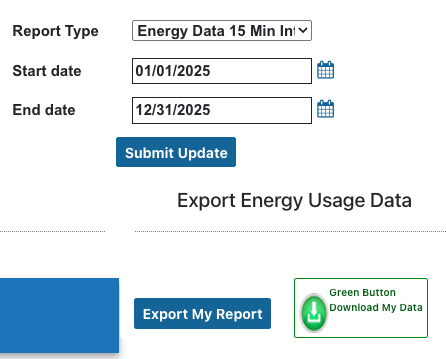
- Select Report Type: “Energy Data 15 minute intervals”.
- Choose the date range you want to analyze (a full 12 months captures both summer AC and winter heating).
- Click Submit Update to generate the report.
- Click Export my Report to download the file as a CSV.
- Upload that CSV file directly into the calculators above.