Comparison Calculators
Texas electricity providers love to pitch complicated plans with catchy names. Free nights and weekends! Tiered rates with bill credits! Time-of-use pricing! They all promise savings, but here’s the catch: the math only works if your actual usage fits their very specific patterns.
Free nights plans charge you nothing during certain hours, but hit you with premium rates the rest of the day. Tiered plans advertise low rates for your first chunk of usage, then jack up the price once you cross their threshold. Time-of-use plans reward off-peak usage but penalize you for running AC on hot weekday afternoons.
The question isn’t whether these plans can save money. It’s whether they’ll save YOU money based on how you actually live.
Stop guessing! Upload your Smart Meter Texas data and see what you’d really pay. These calculators use your real usage patterns to show you if these plans actually save you money compared to a straightforward fixed rate.
Pro Tip: Want to see your monthly bills on a fixed rate plan? Upload your data to the Tiered Rate Calculator and leave the tiered plan fields at their defaults. You’ll get a month-by-month breakdown of what you’d pay.
Electricity Plan Calculators
📥 For the next 4 calculators: You’ll need to create a free account at Smart Meter Texas and download your usage data in 15-minute intervals.
See instructions below for step-by-step guidance.
- Create an account and log in to Smart Meter Texas
- Once logged in, go to your dashboard
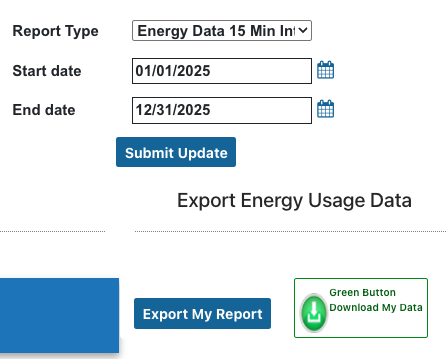
- Choose Report Type “Energy Data 15 minute intervals”
- Choose the dates you want to compare
- Click Submit Update button
- Click the Export my Report button to save as a CSV
- Upload that CSV file to the calculators above